Z-Index Isn't a Number, It's a Context
CSS Edition
February 19, 2026
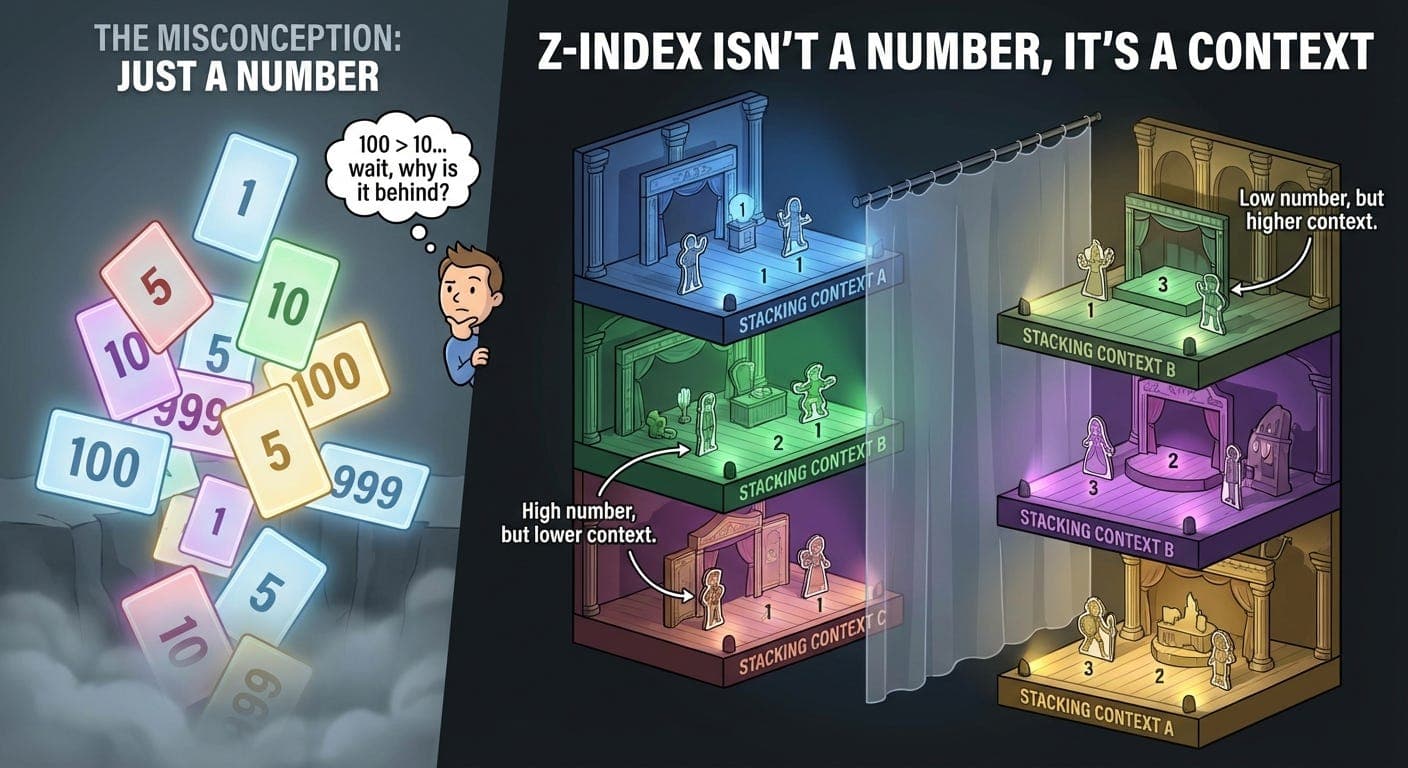
Set z-index: 99999 on a modal. Still rendered behind a dropdown with z-index: 10.
What?
Spent 30 minutes incrementing the number. 999999. 9999999. Added more nines. Didn’t help.
Turns out z-index doesn’t work how I thought it worked.
The Lie We All Believe
Everyone thinks z-index is simple. Higher number = on top. Done.
So you have a dropdown with z-index: 10. Need something above it? Use z-index: 11.
Then it doesn’t work. So you try z-index: 100. Still doesn’t work. Eventually you’re at z-index: 999999 and questioning your life choices.
I’ve been there.
What’s Actually Happening
Z-index doesn’t create a global stack. It creates local stacks called stacking contexts.
Think of it like floors in a building. Each floor has its own stack of items. Items on floor 3 are always above items on floor 2, no matter what their individual z-indexes are.
A person on floor 2 can’t jump to floor 3 by standing on a really tall ladder. They’re stuck on floor 2.
That’s stacking contexts.
When I Finally Got It
Had a modal dialog. Set z-index: 1000 on it. Should be on top of everything, right?
Nope. Dropdown menu with z-index: 5 was covering it.
Looked at the HTML. The modal was inside a parent div with position: relative and z-index: 1. The dropdown was in a different parent with z-index: 2.
The stacking contexts looked like:
- Parent A (z-index: 1)\n - Modal (z-index: 1000) <- stuck on floor 1\n\n- Parent B (z-index: 2) \n - Dropdown (z-index: 5) <- on floor 2, above everything on floor 1
The modal’s z-index: 1000 only mattered within Parent A’s context. Couldn’t escape it.
Parent B was on a higher floor. Everything inside it was above everything in Parent A.
Changed the modal’s parent to z-index: 10. Now the modal showed up on top. Not because I changed the modal’s z-index. Because I moved the entire floor up.
What Creates a Stacking Context
Bunch of CSS properties create new stacking contexts:
The obvious ones:
-
position: relative/absolute/fixed/stickywith a z-index other thanauto -
position: fixedorposition: sticky(even without z-index)
The sneaky ones:
-
opacityless than 1 -
transform(any value exceptnone) -
filter(any value exceptnone) -
will-change(certain values) -
isolation: isolate
That transform one got me so many times.
.parent {\n transform: translateZ(0); /* GPU acceleration trick */\n}\n\n.child {\n z-index: 999; /* Stuck inside parent's context */\n}
Added transform for performance. Accidentally created a stacking context. Now the child’s z-index is trapped.
The Material Dialog Problem
Using Material-UI or any component library with modals? They probably create their own stacking contexts.
Material-UI renders dialogs at the root of the document to avoid z-index issues. But sometimes you have CSS on parent elements that create stacking contexts anyway.
Had a page with:
.page-wrapper {\n transform: translateX(0); /* For animations */\n}
Material dialog rendered inside .page-wrapper. That transform created a context. Dialog’s z-index was meaningless.
Moved the dialog to render outside .page-wrapper. Fixed.
Or removed the transform when the dialog was open. Also fixed.
The 99999 Problem
Seen codebases with z-indexes like:
.dropdown { z-index: 1000; }\n.modal { z-index: 9999; }\n.tooltip { z-index: 99999; }\n.notification { z-index: 999999; }
This is z-index inflation. Doesn’t solve the problem. Just makes it worse.
If you need z-index: 99999, you probably have a stacking context issue. Adding more nines won’t fix it.
How to Actually Fix It
1. Find the stacking context
Use DevTools. Inspect the element. Look for properties that create contexts in parent elements:
-
position+z-index -
opacity< 1 -
transform -
filter
One of those is creating a context you didn’t expect.
2. Remove the context or work with it
Either:
-
Remove the property creating the context
-
Move your element outside that context
-
Adjust the parent’s z-index instead of the child’s
3. Use a portal
React portals render components outside their parent hierarchy:
import { createPortal } from 'react-dom';\n\nfunction Modal() {\n return createPortal(\n <div className="modal">...</div>,\n document.body\n );\n}
Renders at the document root. Escapes parent stacking contexts.
The DevTools Trick
Chrome DevTools can show you stacking contexts.
Inspect an element. Look at the “Layers” panel. Shows which elements have their own layer (often correlates with stacking contexts).
Not perfect, but helps visualize what’s happening.
Real Example: Dropdown in a Card
Had a card component with a dropdown menu inside.
.card {\n position: relative;\n transform: translateY(0); /* For hover animations */\n}\n\n.dropdown-menu {\n position: absolute;\n z-index: 1000;\n}
Dropdown was clipped by the card’s boundaries. Increased z-index to 9999. Still clipped.
Problem: transform on .card created a stacking context. Also created a new containing block. Dropdown was stuck inside.
Solutions:
-
Remove
transformfrom.card(but wanted the animation) -
Move dropdown outside
.cardusing a portal -
Use a different animation technique that doesn’t need
transform
Went with option 2. Dropdown renders at body level. Not clipped anymore.
The Isolation Property
There’s a CSS property specifically for creating stacking contexts without side effects:
.container {\n isolation: isolate;\n}
Creates a stacking context. Nothing else. No positioning changes, no opacity, no transforms.
Useful when you want to contain z-indexes within a component without affecting layout.
.component {\n isolation: isolate;\n}\n\n.component .layer1 { z-index: 1; }\n.component .layer2 { z-index: 2; }
Those z-indexes only compete with each other, not with elements outside .component.
When Negative Z-Index Gets Weird
Negative z-index puts elements behind their stacking context.
.parent {\n position: relative;\n background: white;\n}\n\n.child {\n position: absolute;\n z-index: -1; /* Goes behind parent's background */\n}
The child renders behind the parent. Even though it’s inside the parent in the HTML.
Useful for effects. Confusing if you don’t expect it.
The Fixed Position Gotcha
position: fixed is supposed to position relative to the viewport. Always.
But if a parent has transform, filter, or certain other properties, fixed positioning breaks. The element positions relative to that parent instead.
.parent {\n transform: scale(1);\n}\n\n.child {\n position: fixed; /* Not actually fixed to viewport anymore */\n}\n```\n\nThis broke a sticky header I built. Parent had `transform` for animations. Header wasn't sticking to viewport anymore.\n\nFixed by moving the header outside that parent.\n\n## Visual Mental Model\n\nThink of it like this:\n```\nDocument\n├─ Context A (z-index: 1)\n│ ├─ Element (z-index: 100) <- These only compete with each other\n│ └─ Element (z-index: 50)\n└─ Context B (z-index: 2)\n ├─ Element (z-index: 1) <- Above everything in Context A\n └─ Element (z-index: 5) <- regardless of their z-index values
Context B is a higher floor. Everything in it is above Context A.
Within each context, z-index works normally. But you can’t escape your context.
The Cascade Layer Thing
CSS now has @layer for managing cascade order. Different from stacking contexts.
@layer base, components, utilities;\n\n@layer base {\n .button { z-index: 1; }\n}\n\n@layer components {\n .modal { z-index: 10; }\n}
This is about CSS specificity and cascade order. Not about stacking contexts.
Stacking contexts are runtime. Cascade layers are authoring time.
Different concepts. Both affect what appears on top.
What I Actually Do Now
1. Keep z-indexes low and meaningful
.dropdown { z-index: 10; }\n.modal { z-index: 20; }\n.tooltip { z-index: 30; }
Not 1000, 9999, 99999. Just small numbers that show intent.
2. Check for stacking contexts when things break
If z-index isn’t working, I look for:
-
transformon parent elements -
opacity< 1 -
position: fixedorsticky
Usually find the culprit fast.
3. Use portals for modals and overlays
Render them at document root. Sidestep the whole stacking context mess.
4. Use isolation: isolate to contain z-indexes
Component shouldn’t leak z-index concerns to the rest of the page.
The Library Problem
Component libraries create stacking contexts everywhere. Material-UI, Chakra, whatever.
Their dropdowns, modals, tooltips - all have z-indexes. They work fine within the library.
Then you add your own modal with z-index: 1000. Doesn’t show up above their dropdown with z-index: 50.
Why? They’re in different stacking contexts.
Check the library’s documentation. They usually have guidance on z-index values or ways to override them.
Or use portals. Render your components at the same level as theirs.
The Debugging Checklist
Z-index not working? Check:
-
Is the element positioned? (z-index needs
positionother thanstatic) -
Are there stacking contexts in parent elements? (look for
transform,opacity, etc.) -
Is the parent’s z-index lower than competing elements?
-
Is
position: fixedbeing affected by a parent transform? -
Are you comparing elements in different stacking contexts?
Usually it’s #2 or #3.
What Actually Matters
Z-index isn’t broken. It just has rules.
Higher numbers don’t always win. Context matters more than number.
Once you understand stacking contexts, z-index makes sense. Before that, it feels random.
Most z-index problems aren’t solved by bigger numbers. They’re solved by understanding where the stacking contexts are.
The Thing I Wish I’d Known Earlier
Stop incrementing the number. That’s not the solution.
Find the stacking context. Work with it or around it.
Your z-index: 99999 is fighting the wrong battle. You need to move to a different floor, not build a taller ladder.
Thanks for reading Under The Hood! Subscribe for free to receive new posts and support my work.