The Cascade in CSS (Most People Get This Wrong)
February 12, 2026
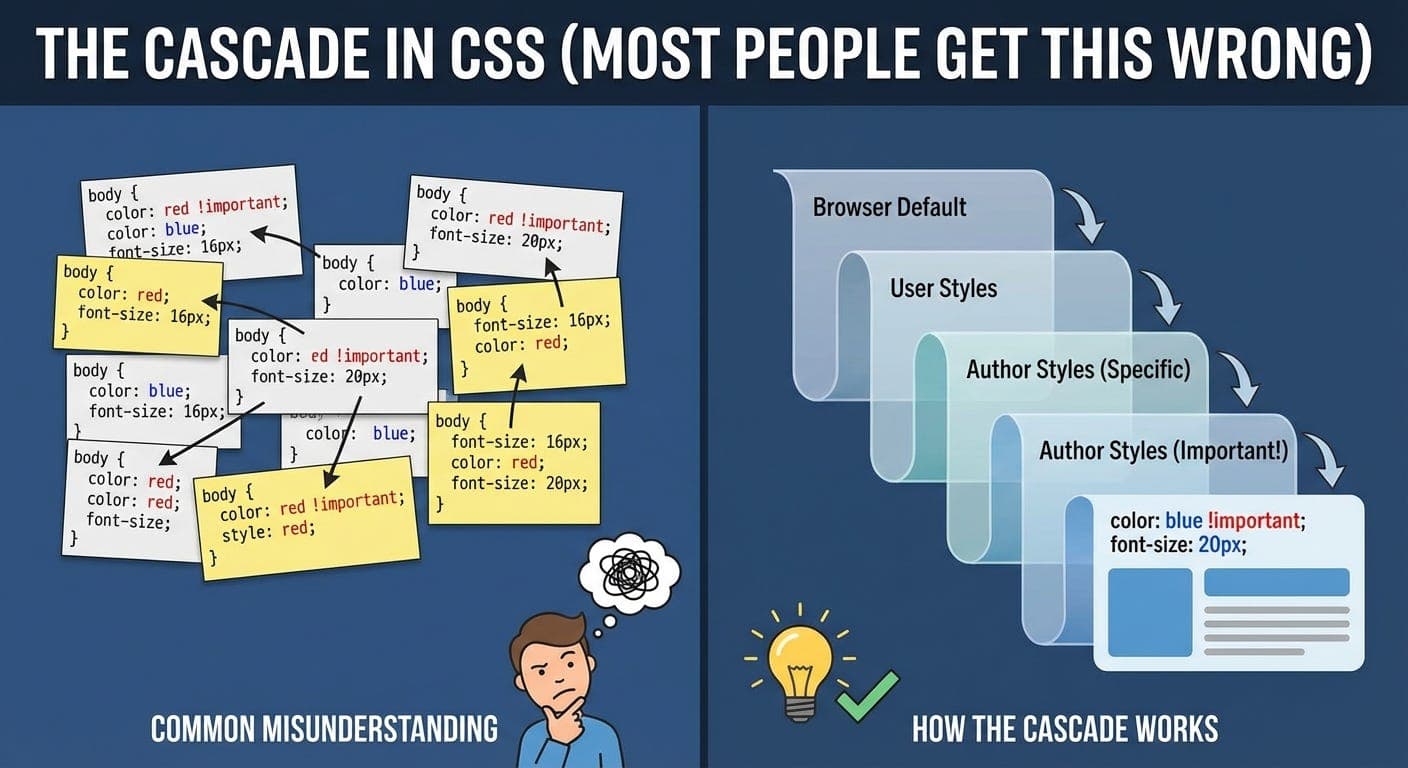
Spent years writing CSS before I actually understood the cascade.
Thought I knew it. Specificity, right? More specific selectors win. Done.
Turns out there’s a whole system I was missing.
The Thing Everyone Gets Half Right
Ask a developer how CSS decides which styles apply, they’ll say “specificity.”
And yeah, specificity matters. But it’s not the whole story.
I had a situation where a less specific selector was winning over a more specific one. Made no sense. Broke my mental model.
Turned out I didn’t actually understand the cascade.
What The Cascade Actually Is
CSS stands for Cascading Style Sheets. The cascade is literally the C in CSS.
It’s the algorithm that decides which styles apply when multiple rules target the same element.
There’s an order to it. Specificity is just one part.
The Real Order (This Is What I Was Missing)
When multiple CSS rules target the same element, the browser decides which one wins based on this order:
-
Origin and Importance
Where did the style come from? Is it marked!important? -
Specificity
How specific is the selector? -
Order of Appearance
Which rule came last in the source code?
Most people skip straight to specificity. That’s why they get confused.
Origin Matters More Than You Think
CSS comes from different sources. The browser checks them in this order:
-
User agent styles (browser defaults)
The styles browsers apply to everything.<h1>is big and bold.<a>is blue and underlined. These are the baseline. -
User styles (custom browser settings)
Some users set their own stylesheets in their browser. Like making all text bigger or changing fonts. Rare, but they exist. -
Author styles (your CSS)
Your stylesheets. What you write. This is what you think of as “CSS.” -
Author
!important
Any rule you marked important. These beat normal author styles. -
User
!important
If a user marks their custom styles important, those beat yours. This is intentional - accessibility. Users with vision problems should be able to override your styles if needed. -
User agent
!important
Browser defaults marked important. Almost never used.
So even before specificity, the browser looks at where the style came from.
Your normal styles beat browser defaults. But user !important styles beat yours.
The !important Thing
Everyone says “don’t use !important” like it’s evil.
Then you end up using it anyway when nothing else works.
Here’s the actual rule: !important changes the origin priority. It jumps your style up in the cascade.
.button {\n color: blue;\n}\n\n.button {\n color: red !important;\n}
Red wins. Not because it’s more specific (same specificity), not because it’s later (it is, but that’s not why). It wins because !important changes its priority.
Where !important gets messy:
/* Your CSS */\n.button {\n color: blue !important;\n}\n\n/* Some library CSS loaded after yours */\n.button {\n color: red !important;\n}
Both are !important. So now it falls back to specificity. If they’re the same specificity, it falls back to order. Red wins because it came last.
Now you need !important on everything just to compete. This is the !important arms race people warn about.
When !important Is Actually Fine
Utility classes:
.text-center {\n text-align: center !important;\n}\n\n.hidden {\n display: none !important;\n}
These should always work. If I add .hidden to something, I want it hidden. Don’t care what other styles say.
!important here makes sense. It’s intentional override.
Overriding third-party styles:
Sometimes a library has really specific selectors. Your only option is !important.
/* Library has */\n.some-library .deeply .nested .selector {\n color: blue;\n}\n\n/* You can either match the specificity */\n.some-library .deeply .nested .selector {\n color: red;\n}\n\n/* Or use !important with less specificity */\n.my-override {\n color: red !important;\n}
Second option is often cleaner.
When you shouldn’t use it:
Don’t use !important to fix specificity problems you created. That’s a sign your CSS architecture needs work.
Specificity (The Part Everyone Knows)
Okay, so after origin, specificity matters.
Specificity is a three-part number: (inline, IDs, classes/attributes/pseudo-classes, elements/pseudo-elements)
Wait, that’s four parts. Whatever, CSS is weird.
/* (0, 0, 1, 0) */\n.button { }\n\n/* (0, 1, 0, 0) */\n#header { }\n\n/* (0, 1, 1, 0) */\n#header .button { }\n\n/* (0, 0, 2, 1) */\n.nav .button:hover { }
Higher numbers win. Compare left to right.
IDs are worth 100 in specificity. Classes are worth 10. Elements are worth 1. (Not actual numbers, just thinking about it that way helps.)
One ID beats any number of classes. One class beats any number of elements.
/* Specificity: (0, 0, 0, 1) */\nbutton { }\n\n/* Specificity: (0, 0, 1, 0) - wins */\n.btn { }\n\n/* Specificity: (0, 1, 0, 0) - wins over .btn */\n#submit { }
Inline Styles Beat Everything
Except !important.
<div class="box" style="color: red;">
That inline color: red beats any class or ID selector from your stylesheet. Inline styles have the highest specificity (except !important).
This is why inline styles are annoying. Hard to override. Need !important or more inline styles.
Order of Appearance (The Tiebreaker)
If two rules have the same origin and same specificity, the last one wins.
.button {\n color: blue;\n}\n\n.button {\n color: red; /* This one wins */\n}
Same specificity. Same origin. Red comes last. Red wins.
This is why CSS file order matters:
<link rel="stylesheet" href="library.css">\n<link rel="stylesheet" href="your-styles.css">
If both have .button rules with the same specificity, your styles win because they’re loaded after.
Flip the order, library styles win.
The Part That Confused Me For Years
Had a situation like this:
/* In base.css */\n.container .text {\n color: blue;\n}\n\n/* In theme.css, loaded after base.css */\n.text {\n color: red;\n}
Expected red. Got blue.
Why? Specificity. .container .text is more specific than .text. Two classes beat one class.
Order doesn’t matter if specificity is different.
I thought “theme.css loads last, so it wins.” Nope. Specificity is checked before order.
Inheritance vs Cascade (Not The Same Thing)
This took me way too long to understand.
-
Cascade: Deciding which rule wins when multiple rules target the same element.
-
Inheritance: Some properties pass down from parent to child elements.
<div style="color: blue;">\n <p>This text is blue</p>\n</div>
The <p> inherits color from the <div>. That’s inheritance, not cascade.
Not all properties inherit. color does. border doesn’t. margin doesn’t.
Makes sense if you think about it. You want text color to inherit. You don’t want margins to stack infinitely down the tree.
Properties that inherit:
-
color
-
font-family, font-size, font-weight, etc.
-
line-height
-
text-align
-
Most text-related properties
Properties that don’t:
-
margin, padding, border
-
width, height
-
position
-
display
-
Most layout properties
When Inheritance Beats Your Styles
This confused me:
<div style="color: blue;">\n <p class="special">Text</p>\n<div>
p {\n /* No color set */\n}\n\n.special {\n font-size: 20px;\n}
Text is blue. Why? Inherits from the div.
I thought “I have styles on .special, why is it still blue?”
Because I didn’t set color on .special. So it inherits from the parent.
If you want to override inherited values:
.special {\n color: red; /* Now it's red */\n}
The Universal Selector Gotcha
* {\n color: red;\n}\n\np {\n color: blue;\n}
What color is a <p>?
Blue.
The universal selector * has zero specificity. Literally (0, 0, 0, 0).
Any element selector beats it. Even though * targets everything.
This surprised me. Thought * was like a wildcard that matched anything strongly. Nope. Weakest specificity possible.
How I Think About It Now
When CSS isn’t working how I expect, I check in this order:
1. Is there an !important somewhere?
Check DevTools. Some library might be using it.
2. What’s the specificity?
Count IDs, classes, elements. Higher number wins.
3. What’s the order?
If specificity is the same, last one wins.
4. Is it inherited?
Maybe the value is coming from a parent element.
5. Is there a more specific selector I don’t see?
Some library CSS with nested selectors I forgot about.
Usually it’s #2 or #5. Specificity is almost always the culprit.
The DevTools Trick
Chrome DevTools shows you all this.
-
Inspect an element. Look at the Styles pane. Strikethrough styles are ones that lost the cascade battle.
-
Hover over a selector. DevTools shows you its specificity.
-
This is how I debug CSS issues. See what’s winning, see what’s losing, understand why.
What Actually Matters
Understanding the cascade means writing better CSS.
You know why styles aren’t applying. You know how to override third-party libraries. You know when !important is okay and when it’s a code smell.
Most importantly, you stop randomly adding !important until something works.
The Real Advice
-
Keep specificity low.
Use single classes when possible. Avoid IDs for styling. Easier to override later. -
Order your CSS intentionally.
Load base styles first, overrides last. Put utility classes at the end. -
Use !important sparingly.
Only for utilities and intentional overrides. Not to fix specificity problems. -
Understand inheritance.
Know which properties inherit. Use it to your advantage instead of fighting it. -
Use DevTools.
Stop guessing. Look at what’s actually winning and why.
The Thing I Wish I’d Known Earlier
The cascade isn’t random or vague. It has rules. Learn the rules, CSS makes sense.
I spent years fighting CSS because I didn’t understand the rules. Thought it was random. Thought specificity was everything.
Once I learned the actual cascade order - origin, specificity, order - everything clicked.
CSS isn’t hard. It’s just specific about its rules. Learn them and you’re good.
Thanks for reading Under The Hood! Subscribe for free to receive new posts and support my work.