Screen Reader Handling of ARIA Live Regions: Timing, Interruptions, and Debugging
Why your live updates sometimes just don’t get announced, and how to fix it
July 28, 2026
Ever had a situation where you update a live notification region in your SPA, but the screen reader stays silent? Or worse, it reads some old message, then skips your update altogether?
I ran into this exact problem recently while working on an accessibility feature that used ARIA live regions to announce dynamic content changes. The updates were there, the DOM was correct, but screen readers just wouldn’t read the new content reliably.
Turns out, live region announcements are not as straightforward as just toggling aria-live. There’s a subtle timing dance behind the scenes, and interruptions can silently swallow your messages. Let me walk you through what I learned debugging this, how screen readers handle live region updates, why timing matters, and practical ways to get your ARIA live announcements working consistently.
The weird silence: live region updates don’t always get announced
I had a <div aria-live="polite"> that I updated with new status messages from an async process. When I tested with NVDA and VoiceOver, the first message would be read, but subsequent updates were sometimes ignored.
At first, I thought my updates weren’t reaching the DOM or the live region was stale. But inspecting with accessibility tools confirmed everything was in place.
Why the silence?
How screen readers process ARIA live regions
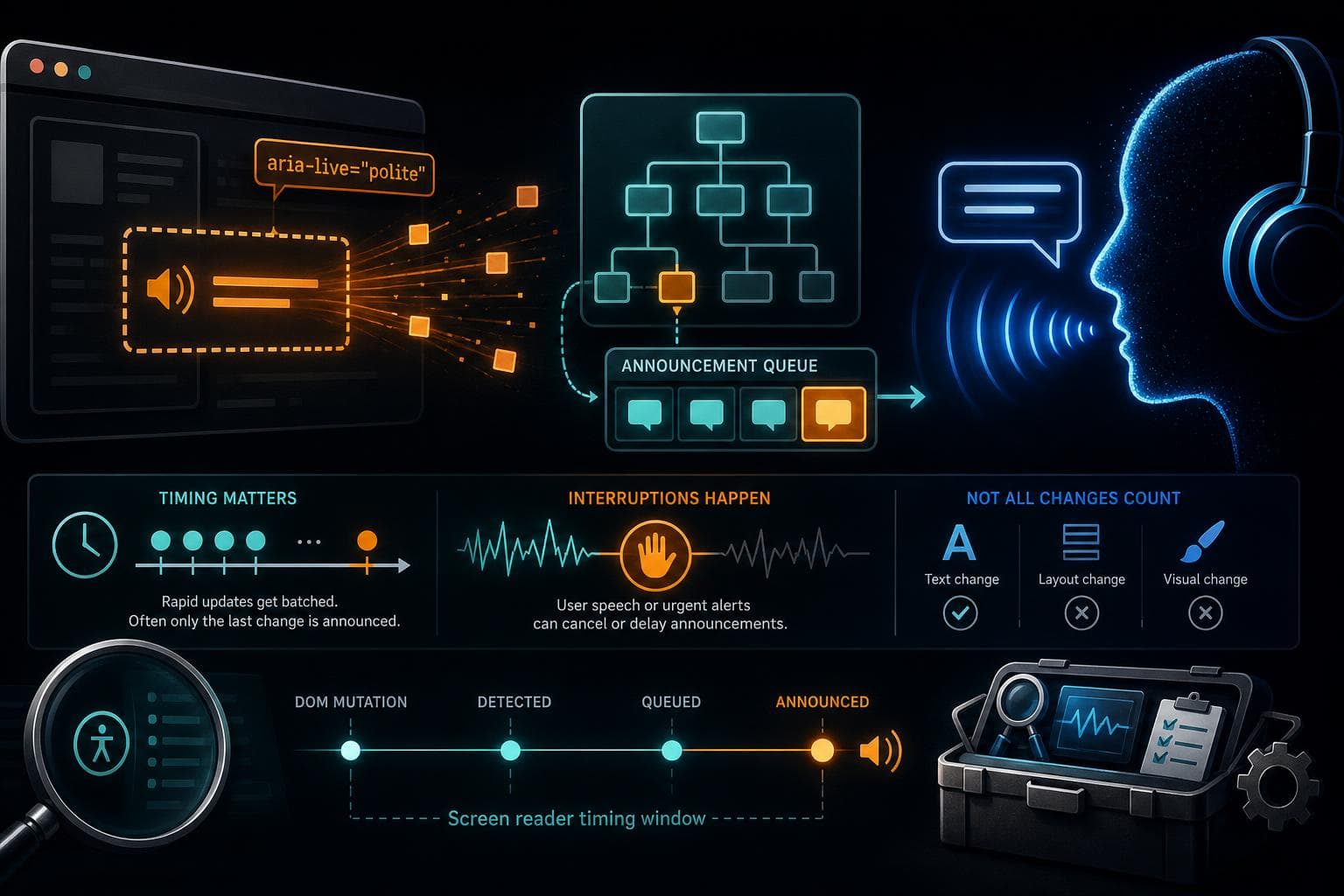
Screen readers maintain an internal accessibility tree representing the current UI state. When the DOM changes inside an ARIA live region, the screen reader detects those changes and queues announcements.
But this queue is subject to:
- Timing thresholds: screen readers batch rapid-fire changes to avoid reading an avalanche of messages.
- Interruptions: a user’s current announcement can block or cancel queued messages.
- Change heuristics: not all changes trigger announcements, e.g., if the content didn't actually change textually.
For example, NVDA waits a little after an update before announcing, to gather potential additional changes. If you update the live region content multiple times quickly, only the last change might get read.
The problem with rapid updates and DOM mutations
Imagine your async process emits several updates in under a second. You might:
liveRegion.textContent = 'Step 1 completed';
liveRegion.textContent = 'Step 2 completed';
liveRegion.textContent = 'All done!';
Only "All done!" might get announced, because the screen reader batches the changes and only reads the final state.
Sometimes, if the updates happen too fast, the screen reader might not even detect intermediate changes.
Interruptions: how user focus and speech affect announcements
Screen readers can interrupt or suppress live region announcements if the user is already listening to something else:
- If the user is navigating the page with the keyboard or mouse.
- If another alert or live region is currently being read.
- If the screen reader is busy announcing system messages.
This means your live region updates can be silently dropped or delayed.
Debugging live region announcements
To figure out what’s going on, I tried:
- Logging live region content changes to confirm updates happened.
- Slowing down updates with
setTimeoutto space out announcements. - Using different
aria-livevalues likeassertiveandpoliteto test priority impacts. - Testing with multiple screen readers (NVDA, JAWS, VoiceOver) since each has quirks.
- Using browser extensions like Accessibility Insights or VoiceOver Utility to inspect the live region's accessibility tree.
One useful trick was creating a small demo page where I manually controlled live region updates via buttons and timers. This let me isolate timing and interruption behaviors.
Under the hood: what you can do to improve live region reliability
-
Throttle or debounce your updates. Avoid flooding the live region with rapid changes. Group related updates and announce consolidated messages.
-
Clear the live region before updating. Setting
textContent = ''briefly before inserting new text can force screen readers to recognize a fresh change. -
Use a hidden off-screen live region element. Sometimes toggling visibility or using a separate hidden live region helps isolate announcements.
-
Experiment with
aria-atomic. Settingaria-atomic="true"tells screen readers to read the entire live region content on change, which helps when partial updates confuse them. -
Match your live region role to the context. Use
role="alert"for urgent messages (immediate announcements) andaria-live="polite"for less disruptive updates. -
Test with real users and multiple screen readers. Each has different heuristics and timing rules.
A concrete example: reliable live region updates in a SPA
Here’s a snippet I ended up using for a status message live region:
const liveRegion = document.getElementById('statusLiveRegion');

function announceStatus(message) {
  // Clear the region to reset announcer
  liveRegion.textContent = '';

  // Add a small delay before updating content
  setTimeout(() => {
    liveRegion.textContent = message;
  }, 100);
}
This brief delay and clearing step forces screen readers to catch the change as new content, not just an update.
On the HTML side:
<div
  id="statusLiveRegion"
  aria-live="polite"
  aria-atomic="true"
  style="position:absolute; width:1px; height:1px; overflow:hidden; clip:rect(1px, 1px, 1px, 1px);"
></div>
This setup worked consistently across NVDA, JAWS, and VoiceOver during my testing.
Why this still isn’t perfect
Screen reader implementations vary wildly. Some might ignore live region updates if the user has disabled announcements or if the browser accessibility API behaves differently.
Also, complex content inside live regions (HTML markup, images, or dynamic widgets) can confuse announcements.
The best you can do is:
- Keep live region content simple and textual.
- Minimize rapid updates.
- Test on your target platforms.
What I wish I knew sooner
I wasted hours chasing bugs where live region content was correct but announcements silent. Understanding the importance of timing and interruptions was a game changer.
Also, don’t assume aria-live is magic. It’s a hint to screen readers, which have their own rules and priorities.
Next time you build dynamic live notifications in your app, remember it’s a conversation between your DOM and the screen reader’s internal queue. Getting the timing and content right is how you make that conversation audible.
Give these tips a try and save yourself the frustration of silent live regions!