React Concurrent Rendering: Scheduling, Interruptions, and Debugging Suspense Boundaries
How React’s scheduler juggles priorities, interrupts work, and makes Suspense boundaries behave — and how to make sense of it when things go sideways
August 3, 2026
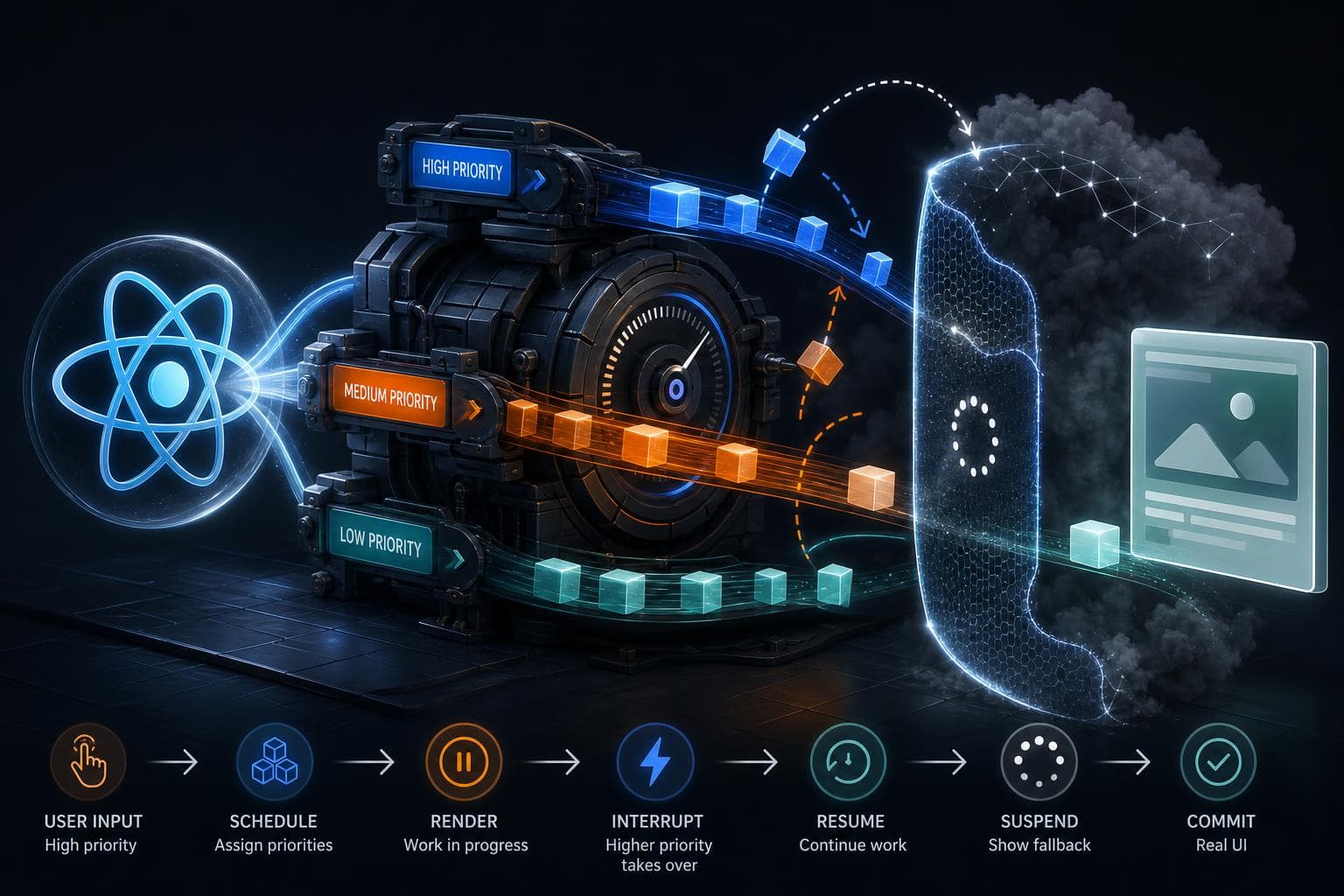
You know that moment when your React Suspense fallback jumps on the screen, then disappears, then reappears, leaving you wondering if you did something wrong? I’ve been there , seeing flickers, multiple loading spinners, or even UI glitches around Suspense felt like chasing ghosts.
Turns out, React’s concurrent rendering scheduler is doing a lot behind the scenes , juggling priorities, pausing work, and restarting it , and Suspense boundaries are right in the middle of this dance. Understanding how React schedules work and handles interruptions can save you hours of frustration.
React’s concurrent rendering scheduler: what’s it really doing?
React’s concurrent mode isn’t just a fancy name; it means React doesn’t blindly render your entire component tree all at once. Instead, it breaks rendering work into chunks and spreads it out over multiple frames. This keeps your app responsive to user input and other high-priority tasks.
Imagine you’re painting a huge mural. Instead of finishing it in one go (blocking everything else), you paint a little, step back, listen if someone calls you, then paint some more. React’s scheduler works similarly:
- Units of work: React slices rendering into small units it can pause and resume.
- Priorities: Some updates are more urgent , like responding to a click , so they jump ahead.
- Interruptions: If something more important comes up, React pauses current work and switches.
This model makes React apps feel snappy even when doing heavy rendering or fetching data.
What happens when Suspense enters the scene?
Suspense boundaries are React’s way to say, “Hey, if this component isn’t ready yet (because it’s waiting on data, code, or something else), show this fallback for now.”
Under the hood, when a component suspends (throws a Promise), React marks that unit of work as "waiting," and the Suspense boundary kicks in to show the fallback UI immediately.
But here’s the catch: React keeps trying to finish rendering the suspended component in the background. When the Promise resolves, React attempts to commit the real UI.
Since this happens with React’s concurrent scheduler, the work can be interrupted or retried multiple times before committing, which explains those flickers or fallback flashes you see.
How React prioritizes and interrupts updates
Let’s say the Suspense boundary is showing a spinner for a data fetch. While the fetch is pending, React is rendering lower-priority work. But if the user types or clicks, React wants to respond immediately:
- The scheduler interrupts the current render.
- It pauses the Suspense boundary’s work.
- It starts a higher-priority render (like updating an input).
Once high-priority work is done, React resumes the Suspense boundary rendering.
This pause-and-resume cycle can happen multiple times, which often causes the fallback to appear and disappear several times rapidly.
Why does Suspense sometimes unexpectedly remount or reset state?
One tricky side effect is that when Suspense boundaries retry rendering, React may discard work in progress and start over. This can cause components inside Suspense to unmount and remount , resetting local state.
For example, if you have a form inside a Suspense boundary, users might lose their input unexpectedly if the boundary retries.
This happens because React’s internal fiber tree abandons the current render and attempts a fresh one when interrupted or when new data arrives.
Debugging Suspense boundaries in production
When Suspense boundaries behave oddly, here’s how to get a clearer picture:
- Enable React DevTools Profiler: It shows you when rendering work starts, suspends, and commits.
- Use
React.unstable_traceor React 18’s tracing APIs: They help track update flows and see interruptions. - Add logging inside your Suspense fallback and wrapped components: Knowing when they mount, unmount, or suspend helps.
- Check for state resets: If state inside Suspense resets unexpectedly, consider moving state above the boundary or using
useRefto preserve values.
Practical tips to reduce flickers and interruptions
- Batch updates: Group multiple setState calls to reduce intermediate renders.
- Use
useTransitionwisely: Mark non-urgent updates as transitions so React can better prioritize. - Split Suspense boundaries thoughtfully: Smaller boundaries isolate suspensions and reduce widespread UI resets.
- Avoid putting critical state inside Suspense boundaries that might remount.
When you want to dive deeper into the scheduler
React’s scheduler uses priority lanes internally , like lanes on a highway , to organize and reorder work. High priority lanes are for urgent tasks like user input, while low priority lanes are for background data loading.
If you’re curious, the React source code and some community tools expose these internals so you can peek under the hood.
Understanding this helps explain why some updates interrupt others and how React keeps your app responsive even during heavy lifting.
React’s concurrent rendering isn’t magic, but it’s subtle. That flickering spinner or disappearing UI isn’t a bug , it’s React doing its best to balance responsiveness and completeness.
With this inside view of scheduling, interruptions, and Suspense boundaries, you can debug smarter, design boundaries better, and build smoother experiences for your users.