preventDefault() vs stopPropagation() vs return false
January 27, 2026
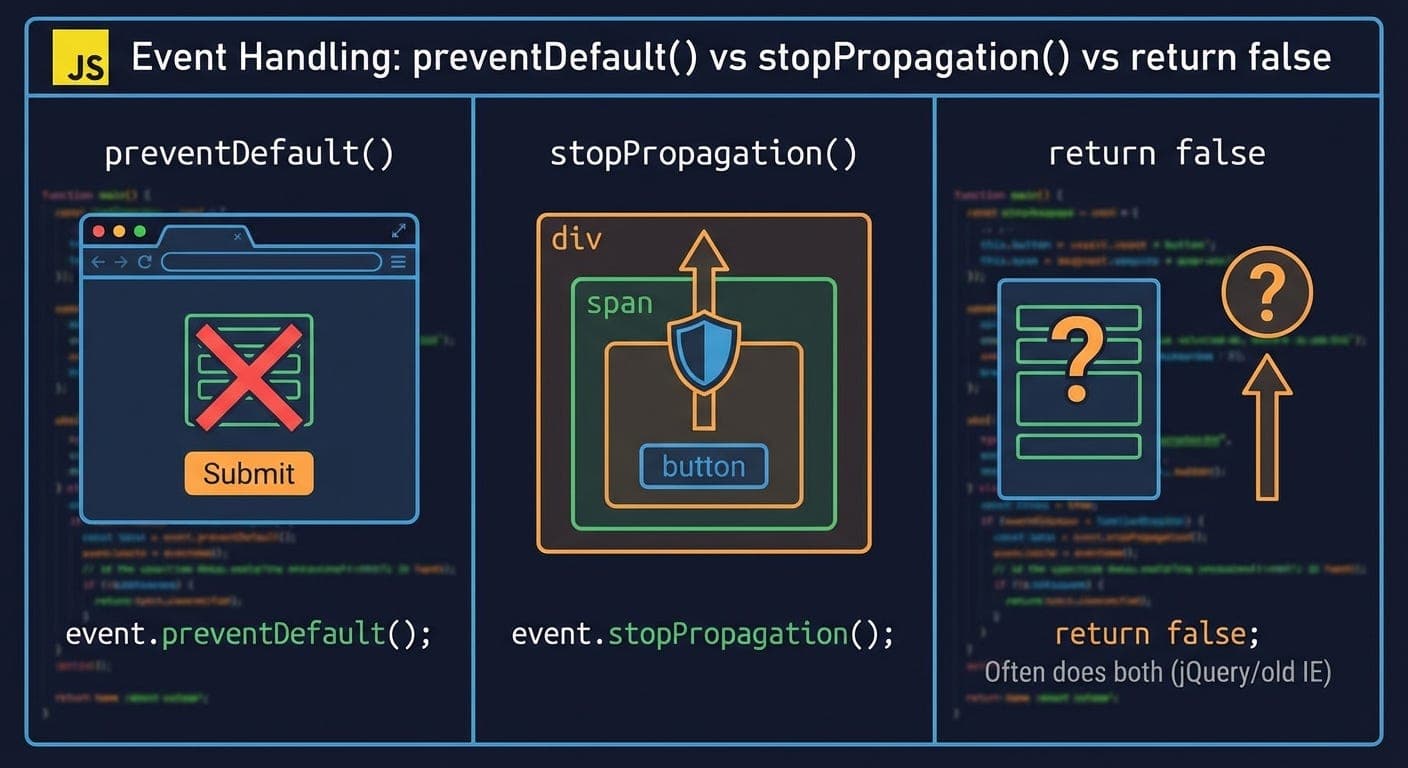
Over the course of my career, I spent an embarrassing amount of time confused about these three. They all seem to “stop” events, but they’re doing completely different things.
Clicked a link, it didn’t navigate. Thought I needed preventDefault(). Added it. Link still didn’t work. Turns out I needed stopPropagation(). Or maybe I didn’t need either. Took me way too long to figure out which was which.
What Each Actually Does
preventDefault() - Stops the browser’s default action
link.addEventListener('click', (e) => {\n e.preventDefault();\n // Link doesn't navigate anymore\n // But the click event still bubbles up\n});
The click event still fires. Parent elements still hear about it. Just the “navigate to this URL” part doesn’t happen.
stopPropagation() - Stops the event from bubbling up
button.addEventListener('click', (e) => {\n e.stopPropagation();\n // Parent elements don't hear about this click\n // But if this button has a default action, it still happens\n});
The event doesn’t travel up the DOM tree. But any default browser behavior still happens.
return false - Does different things depending on context
In vanilla JavaScript event listeners: Does nothing.
button.addEventListener('click', (e) => {\n return false; // This doesn't do anything\n});
In inline HTML handlers: Calls preventDefault().
<a href="/page" onclick="return false">Link</a>\n<!-- Link doesn't navigate -->
In jQuery: Does BOTH preventDefault() AND stopPropagation().
$('button').click(function() {\n return false; // Prevents default AND stops propagation\n});
This inconsistency is why people get confused.
When I Finally Understood This
Built a modal dialog. Had a close button. Clicking it should close the modal. Simple, right?
modal.addEventListener('click', () => {\n closeModal();\n});\n\ncloseButton.addEventListener('click', () => {\n closeModal();\n});
Clicked the button. Modal closed twice. Wait, what?
The click on the button bubbled up to the modal. Both handlers fired. Modal tried to close twice (didn’t break anything, but still wrong).
Fixed it:
closeButton.addEventListener('click', (e) => {\n e.stopPropagation();\n closeModal();\n});
Now the button click doesn’t bubble to the modal. Problem solved.
That’s when stopPropagation clicked for me. It’s not about preventing default actions. It’s about stopping event bubbling.
The Link Problem
Had a navigation menu. Links inside it. Wanted to track clicks for analytics before navigating.
links.forEach(link => {\n link.addEventListener('click', (e) => {\n trackClick(link.href);\n // Link doesn't navigate! Why?\n });\n});
Oh. trackClick() is async. By the time it finishes, the navigation already happened. Or... wait, no. Navigation happened immediately. The tracking happens after.
Tried this:
links.forEach(link => {\n link.addEventListener('click', (e) => {\n e.preventDefault();\n trackClick(link.href).then(() => {\n window.location.href = link.href;\n });\n });\n});
Now it works. Prevent the default navigation, track the click, navigate manually after tracking completes.
That’s preventDefault(). Not stopping the event bubble. Just stopping the browser’s “follow this link” behavior.
The Form Submission Thing
Forms submit when you press Enter in an input or click a submit button. Sometimes you want to stop that.
form.addEventListener('submit', (e) => {\n e.preventDefault();\n // Form doesn't submit to the server\n // Handle it with JavaScript instead\n});
This is the most common use case for preventDefault(). Stop the form from doing its normal “POST to server and reload page” thing. Handle it yourself with fetch or whatever.
Without preventDefault(), the form submits and the page reloads before your JavaScript can do anything.
Event Bubbling (The Thing stopPropagation Stops)
Events bubble from the target element up through its parents. Click a button inside a div inside a section? All three can hear the click.
<section>\n <div>\n <button>Click me</button>\n </div>\n</section>
document.querySelector('section').addEventListener('click', () => {\n console.log('Section clicked');\n});\n\ndocument.querySelector('div').addEventListener('click', () => {\n console.log('Div clicked');\n});\n\ndocument.querySelector('button').addEventListener('click', () => {\n console.log('Button clicked');\n});\n```\n\nClick the button, you see:\n```\nButton clicked\nDiv clicked\nSection clicked
Add stopPropagation to the button handler:
document.querySelector('button').addEventListener('click', (e) => {\n e.stopPropagation();\n console.log('Button clicked');\n});\n```\n\nNow you only see:\n```\nButton clicked
The event never reaches the div or section.
The jQuery Return False Mess
jQuery made return false do both preventDefault() and stopPropagation(). Seemed convenient at the time.
$('a').click(function() {\n // Do something\n return false; // Prevents navigation AND stops bubbling\n});
Problem: People learned this pattern, then moved to vanilla JavaScript and expected it to work the same way. It doesn’t.
I did this. Wrote return false in a vanilla event listener. Wondered why it didn’t prevent anything. Felt dumb when I realized.
jQuery’s decision here was... not great. Created a generation of developers who didn’t understand what preventDefault and stopPropagation actually do because jQuery hid them behind return false.
When You Actually Need stopPropagation
Less often than you think.
I used to throw stopPropagation everywhere. Click on a dropdown item? Stop propagation. Click a button? Stop propagation. Everything stopped propagating.
Then I’d wonder why my click-outside-to-close logic didn’t work. Oh right, I stopped all the clicks from propagating to the document where I was listening for them.
stopPropagation is useful when:
-
Child elements should handle events without parents knowing
-
You have overlapping click areas and want to prevent double-handling
-
You’re doing event delegation and need to prevent higher handlers from firing
But most of the time? You don’t need it. Events bubbling is usually fine.
When You Need preventDefault
All the time. This one’s actually useful.
-
Forms: Stop submission to handle with JavaScript
-
Links: Stop navigation to do something first
-
Context menu: Stop the browser menu to show your own
-
Drag and drop: Stop default drag behavior
-
Keyboard shortcuts: Stop browser defaults (like Ctrl+S saving the page)
preventDefault is about saying “browser, don’t do your normal thing, I’m handling this.”
The Event Delegation Pattern
This is where understanding bubbling matters.
Instead of:
document.querySelectorAll('.delete-button').forEach(button => {\n button.addEventListener('click', handleDelete);\n});
Do this:
document.querySelector('.item-list').addEventListener('click', (e) => {\n if (e.target.classList.contains('delete-button')) {\n handleDelete(e);\n }\n});
One listener on the parent, check what was actually clicked. Works for dynamically added items too.
But if child elements call stopPropagation, this breaks. The click never reaches the parent you’re listening on.
This is why I stopped using stopPropagation everywhere. Delegation is too useful.
The return false Mental Model
Here’s how I think about it now:
Vanilla JavaScript: return false does nothing in event listeners. Ignore it.
Inline handlers: return false prevents default. But don’t use inline handlers anyway.
jQuery: return false does both things. If you’re still using jQuery, just use e.preventDefault() and e.stopPropagation() explicitly instead. More clear what you’re doing.
Basically: Don’t use return false for event handling. Be explicit about what you want.
What I Actually Do
95% of the time: e.preventDefault() alone
-
Forms
-
Links
-
Any default browser action I’m replacing
5% of the time: e.stopPropagation() alone
-
Modal close buttons
-
Nested interactive elements
-
Preventing event delegation conflicts
Almost never: Both together
-
Can’t think of a common case where you need both
-
If you do, call them explicitly, don’t rely on return false
Never: return false
-
Too confusing
-
Different behavior in different contexts
-
Just use the real methods
The Debugging Tip
Not sure if an event is bubbling when you don’t want it to?
element.addEventListener('click', (e) => {\n console.log('Clicked:', e.target);\n console.log('Current target:', e.currentTarget);\n});
e.target is what you actually clicked. e.currentTarget is where the listener is attached. If they’re different, the event bubbled.
Saved me debugging time more than once.
The Actual Best Practice
Be explicit. If you need to prevent default, write e.preventDefault(). If you need to stop propagation, write e.stopPropagation(). Don’t use clever shortcuts that hide what’s happening.
Future you (or your coworkers) will understand the code better.
And before you add stopPropagation, ask yourself if you really need it. Most of the time, you don’t. Event bubbling is a feature, not a bug.
Thanks for reading Under The Hood! Subscribe for free to receive new posts and support my work.