Hydration Pitfalls in Modern Frameworks: What Really Happens When the Client Reconciles Server HTML
Why hydration mismatches cause subtle UI glitches and how to decode them under the hood
November 2, 2026
You ever deploy your server-rendered React or Vue app with all the fanfare, only to find a flicker, an unexpected warning, or worse, a broken interactive UI on first load? You check the markup, and it looks right. The data’s there. But the client complains about hydration mismatches or silently drops event handlers.
I’ve been there, chasing these ghostly bugs that show up only in production or in certain browsers. Hydration can feel like magic , but when it breaks, it’s maddening. So what’s actually going on when your client-side JavaScript reconciles the server-rendered HTML?
Hydration: The Client’s Attempt to Reuse Server HTML
Modern frameworks like React, Vue, or Svelte often send fully rendered HTML from the server on the initial load. This gets your page visible asap, with meaningful content for SEO and performance. But the client still needs to hook up event listeners, internal state, and reactivity. That's where hydration comes in.
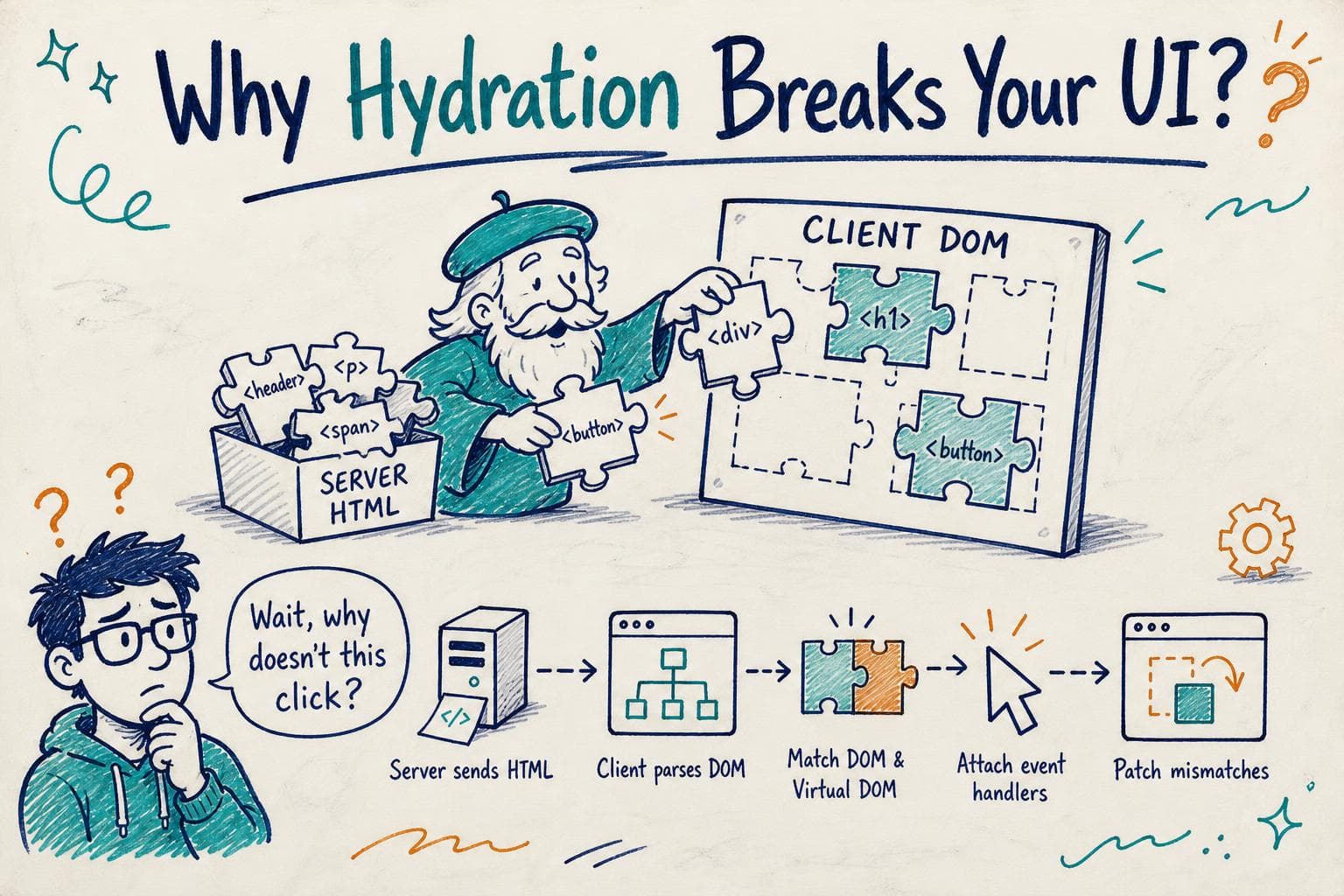
Hydration is the process where the client-side JavaScript parses the existing server HTML, matches it to the virtual DOM or component tree, and attaches event listeners and internal state without throwing away the HTML and re-rendering from scratch.
Imagine you sent this HTML for a button:
<button id="like-btn">Like (10)</button>
When your React or Vue client script runs, it looks for that button node and "hydrates" it , meaning it attaches the click handler and syncs the internal state so that when you click, the count can update.
The Fragility of Hydration: When Markup and State Don’t Match
Here’s the catch. Hydration expects that the client’s initial render output exactly matches the server's HTML. If there’s any mismatch , even a minor difference in attributes, element order, or text , hydration can fail in weird ways:
- Warnings about mismatches in the console
- Missing or broken event handlers
- UI flickering as the client throws away server HTML and re-renders
- Subtle glitches because DOM nodes are reused incorrectly
Why do mismatches happen?
- Non-deterministic rendering: Your server and client generate slightly different markup because of randomness or date/time values.
- State divergence: The client initializes with different default state than the server used to render.
- Conditional rendering differences: Some code paths run only on server or client (e.g., checking
windowor user agent). - Hydration-unfriendly code: Using
useEffectvsuseLayoutEffector code that mutates DOM outside React’s control.
Here’s a real example I ran into with a React app:
function Welcome({ user }) {
  const [greeting, setGreeting] = React.useState('');

  React.useEffect(() => {
    setGreeting(`Hello, ${user.name}`);
  }, [user.name]);

  return <div>{greeting}</div>;
}
The server rendered <div></div> because greeting was initially empty. On the client, after hydration, the effect runs and updates the greeting. React complains about a mismatch because the server HTML was empty but the client wants Hello, Alice.
What Happens Under the Hood During Hydration?
The hydration algorithm tries to reconcile the existing DOM nodes with the virtual DOM tree produced during client-side render:
- Walk the DOM tree: It traverses the server HTML nodes.
- Compare nodes: It compares each node to the corresponding virtual DOM node.
- Attach event listeners: Instead of recreating nodes, it hooks event handlers.
- Patch mismatches: If a node doesn’t match, it replaces it or triggers a full re-render.
Because of this careful match, even a small difference in text content or attribute can cause React or Vue to throw warnings or discard parts of the DOM.
Debugging Hydration Mismatches: Practical Tips
Hydration bugs are tricky because they often don’t happen in development (where server and client run on the same machine and state) but show up in production.
Here’s how I approach diagnosing them:
- Check console warnings: Framework warnings about hydration mismatches are usually your first clue.
- Compare server and client markup: Use browser devtools or capture server HTML to diff with client-rendered markup.
- Ensure deterministic rendering: Avoid randomness or date/time in server render without matching client initialization.
- Use SSR-safe conditionals: Guard client-only code with checks like
typeof window !== 'undefined'. - Hydration-specific hooks: In React, prefer
useLayoutEffectoveruseEffectfor DOM mutations related to hydration. - Test in production mode: Dev mode often suppresses hydration mismatches or behaves differently.
When Hydration Goes Wrong: Side Effects to Watch
Sometimes hydration fails silently:
- React events don’t fire because listeners weren’t attached.
- Server markup looks correct but client code is out of sync.
- Flickering as React discards server HTML and renders again.
If you see these, try:
- Forcing a client-only render after hydration (as a last resort).
- Logging the initial client render output to compare with server HTML.
- Breaking down components to isolate which causes mismatches.
Wrapping Up
Hydration is a clever optimization but a fragile handshake between server and client. Every time you see weird UI glitches or console warnings about hydration, remember it means your client and server markup aren’t perfectly in sync.
By understanding what hydration does under the hood , matching DOM nodes, attaching event handlers, and patching differences , you can better reason about why mismatches happen.
Next time your hydration breaks, try comparing server and client markup, audit your data and render logic for divergence, and use deterministic rendering patterns. It’s a finicky beast, but with practice, you’ll learn to tame hydration for smooth, fast, and reliable rendering.
Happy hydrating!