Hydration Isn't Magic — Here's the Exact Sequence That Breaks It
JS Edition
July 6, 2026
If you have used Next.js, Nuxt, Remix, or any server-rendered React framework, you have almost certainly seen this warning at some point:
Warning: Text content did not match. Server: "Hello" Client: "Hello!"
Or the page loads fine visually but buttons do not respond for a second or two. Or something flickers on first load in a way that never happens in development. These are hydration problems, and they are confusing because they involve two separate rendering passes that are supposed to produce identical output but sometimes do not.
To understand why they break, you first need to understand what hydration actually is.
What hydration is
When you load a server-rendered page, the server generates the full HTML and sends it to the browser. The user sees content immediately, before any JavaScript has loaded. That is the whole point of server-side rendering — fast initial paint, content visible right away.
But that HTML is inert. The buttons do nothing. The forms do not submit. The React components are just static markup at this point. JavaScript has not touched them yet.
Hydration is the process where React downloads, parses, and runs on the client, looks at the existing HTML the server produced, and attaches event listeners and component state to it. React does not re-render the page from scratch. It walks the existing DOM and claims it.
Think of it like a puppeteer attaching strings to a puppet that is already on stage. The puppet is there, the audience can see it, but it cannot move until the strings are attached.
When hydration works correctly, the transition is invisible. The user sees content immediately from the server HTML, and by the time they try to interact with anything, React has already attached its handlers. Seamless.
When it breaks, you get one of several failure modes, each with its own cause.
The mismatch problem
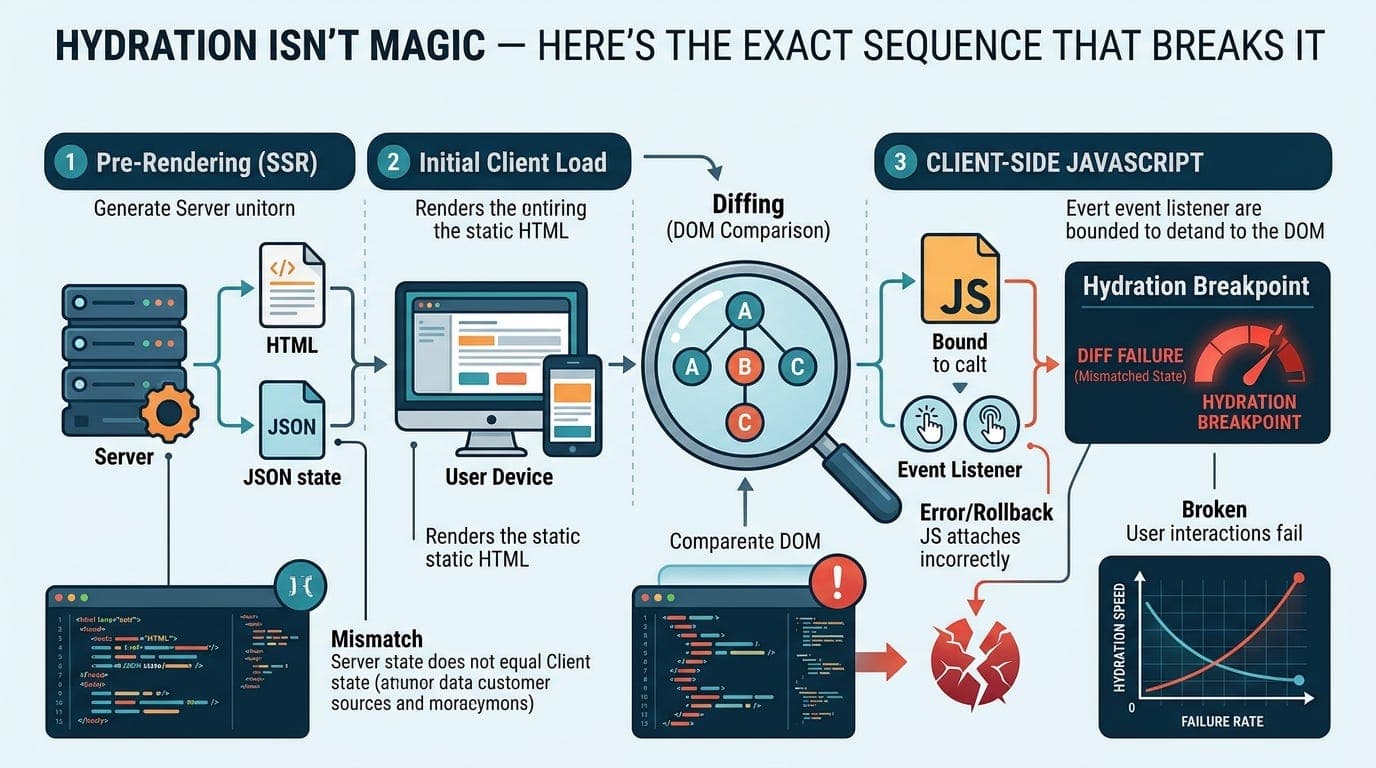
React hydrates by comparing what the server rendered to what the client would render. If they match, React adopts the existing DOM nodes. If they do not match, React throws a warning and, in some cases, re-renders the entire component tree from scratch on the client, throwing away the server HTML.
That re-render is expensive. It is also visually jarring because it happens after the server HTML has already been painted.
The most common cause of mismatches is code that produces different output on server and client. The classic example is anything that reads from browser APIs:
function Greeting() {\n return <p>You are using {navigator.userAgent}</p>\n}
navigator does not exist on the server. This component crashes during server rendering, or you guard it and it renders something different, and now the server and client output disagree.
Dates and times are another common culprit:
function Timestamp() {\n return <p>Rendered at {new Date().toLocaleTimeString()}</p>\n}
The server renders this at one time. The client renders it a few hundred milliseconds later. Different strings. Mismatch.
Random values, Math.random(), anything that reads from localStorage or cookies without careful handling — all of these can cause mismatches.
The sequence that breaks it
Here is the exact order of events during a hydration failure:
First, the server renders your component tree to an HTML string and sends it to the browser. The browser paints that HTML. The user sees content.
Second, the JavaScript bundle downloads and React initialises on the client.
Third, React calls your component functions again to build a virtual DOM tree representing what the client thinks the UI should look like.
Fourth, React walks the real DOM (the server HTML) and the virtual DOM simultaneously, comparing them node by node.
Fifth, if any node does not match, React logs a warning and bails out of adopting that subtree. It re-renders from that node downward using client-side rendering, replacing the server HTML with client-generated DOM.
The user may see a flicker at this point. If the mismatch is near the root of the tree, the entire page re-renders on the client. Your server rendering was wasted.
Sixth, React finishes attaching event listeners. The page becomes interactive.
The gap between step one (content visible) and step six (interactive) is called the Time to Interactive. During this window, the page looks functional but is not. Clicks do nothing. This window gets longer the bigger your JavaScript bundle is.
The suppressHydrationWarning escape hatch
React gives you an official way to opt specific elements out of hydration checking:
<p suppressHydrationWarning>\n {new Date().toLocaleTimeString()}\n</p>
React will not check this element for mismatches. It renders the server HTML as-is and moves on. Use this for genuinely unavoidable cases where the content is expected to differ, like timestamps or user-specific values that cannot be known at server render time.
Do not use it to silence warnings you do not understand. The warning exists for a reason. Suppressing it without knowing why is hiding a bug, not fixing it.
The useEffect pattern for browser-only code
The correct way to handle code that only works in the browser is to defer it to after hydration:
function ClientOnly({ children }) {\n const [mounted, setMounted] = useState(false);\n\n useEffect(() => {\n setMounted(true);\n }, []);\n\n if (!mounted) return null;\n return children;\n}
useEffect does not run on the server. It only runs after the component has mounted in the browser. So anything inside it is guaranteed to run after hydration is complete.
Wrapping browser-only components in this pattern means the server renders nothing for that slot, the client renders nothing on first pass, and after hydration the real content appears. No mismatch. The trade-off is that browser-only content is not in the initial server HTML, so it will not be visible until JavaScript runs.
Partial hydration and why frameworks are moving toward it
The hydration model React uses is sometimes called full hydration. The entire component tree hydrates, even components that are completely static and will never change.
This is wasteful. A static footer does not need event listeners. A marketing paragraph does not need React. But with full hydration, React still walks those components and verifies them.
Newer frameworks and React’s own server components move toward partial or selective hydration. The idea is that static parts of the UI ship as pure HTML and are never hydrated. Only interactive components get the JavaScript treatment.
Astro takes this the furthest with its islands architecture. Components are static by default. You opt into hydration explicitly:
<Counter client:load />
Everything else is plain HTML. No hydration cost for the parts that do not need it.
React Server Components push in the same direction. Server components render to HTML on the server and are never sent to the client as JavaScript. Client components are the exception, not the default.
The practical checklist
If you are debugging a hydration issue, check these in order.
-
Any code that reads browser globals (window, document, navigator, localStorage) needs to be inside useEffect or guarded with a typeof window check.
-
Any code that produces time-dependent or random output needs to either be static, deferred to the client, or have suppressHydrationWarning applied if the difference is genuinely acceptable.
-
Browser extensions that modify the DOM can cause hydration mismatches. If you see mismatches you cannot explain in code, test in a clean browser profile with extensions disabled.
-
If you are using a CSS-in-JS library, check whether it supports server-side rendering properly. Some generate class names dynamically and produce different names on server and client.
Hydration mismatches in development are warnings. In production, React is less verbose about them but still fixes them by re-rendering. The performance cost is real even when you cannot see the warning.
The honest summary
Hydration is a workaround for a fundamental tension: users want content fast (server rendering) and developers want interactivity (JavaScript). Hydration tries to give you both by rendering twice and stitching the results together.
When the two renders agree, it is seamless. When they disagree, you pay a real cost in performance and sometimes in user experience. The frameworks are slowly moving toward architectures that make this less fragile, but understanding the sequence is what lets you debug it when it goes wrong.
Thanks for reading Under The Hood! Subscribe for free to receive new posts and support my work.