How Frameworks Implement Suspense and Lazy Loading Under the Hood
Understanding the magic behind Suspense, promises, fallback coordination, and debugging loading glitches
November 4, 2026
You know that feeling when your React app suddenly shows the fallback spinner for a fraction longer than it should? Or maybe it flashes the loading state again even though the data was already fetched? If you’ve ever stared at Suspense boundaries wondering why the loading UI isn’t syncing perfectly, you’re not alone.
I recently dug into how frameworks like React implement Suspense and lazy loading under the hood. It turns out there’s an intricate dance behind those fallback UIs, promise tracking, and render coordination. Let me walk you through how it really works, with concrete examples and debugging tips.
The Common Developer Headache: Fallback Spinners That Don’t Behave
Imagine this scenario: you wrap a component with React’s <Suspense fallback={<Spinner />}>. Inside, you’re lazy-loading a module or fetching some data asynchronously.
<Suspense fallback={<Spinner />}>
  <Profile />
</Suspense>
You expect the spinner to show only when the data or code isn’t ready, then disappear immediately once it resolves. But sometimes, the spinner flickers on and off, or the UI seems to bounce between loading and loaded states unexpectedly.
Why does that happen?
Suspense Is Built on Promise Throwing , Literally
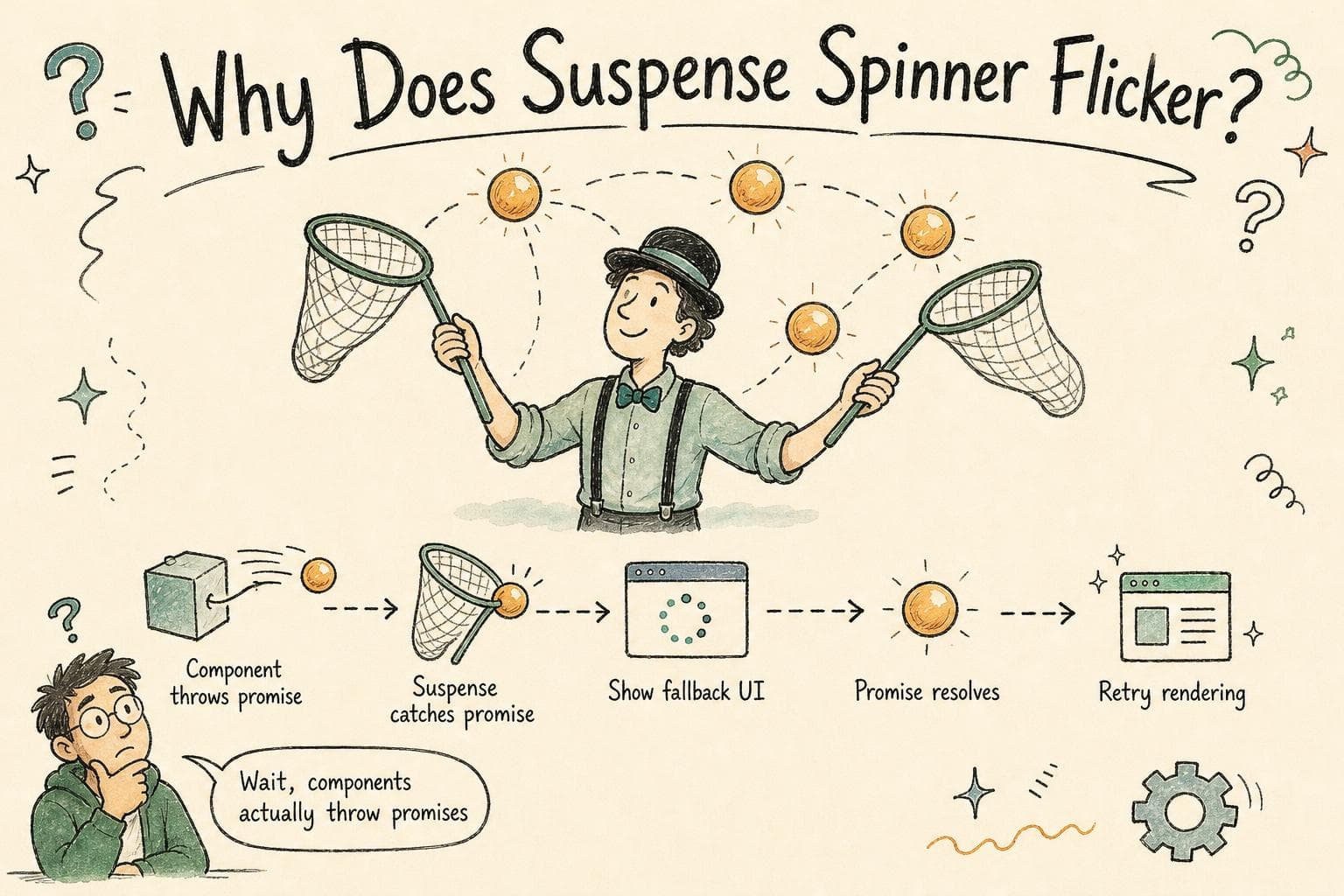
Under the hood, Suspense relies on a clever trick: components that are not ready "throw" a promise during rendering. Yes, they throw promises, not errors.
Here’s what happens:
- When React starts rendering a component wrapped in Suspense, the component tries to read some data or module.
- If that data isn’t ready yet, the component throws a promise.
- React catches that promise and knows to suspend rendering this part of the tree.
- React then shows the fallback UI you provided.
When the promise resolves, React retries rendering the suspended component.
This mechanism lets React pause rendering until the async data or code is ready, without blocking the whole UI thread.
How Frameworks Track These Promises
Now, how does React (or other frameworks) keep track of these thrown promises?
React maintains an internal map of all pending promises thrown by components inside a Suspense boundary. For each Suspense boundary, it knows:
- Which promises are currently pending
- When all promises have resolved
When the last promise inside a Suspense boundary resolves, React knows it can stop showing the fallback and commit the fully rendered UI.
This tracking happens during the render phase. When a thrown promise settles, React schedules an update to retry rendering that boundary.
Coordinating Fallback Rendering Across Multiple Suspense Boundaries
If you have nested Suspense boundaries, React manages each one independently but also coordinates rendering so that fallbacks don’t conflict or flicker.
For example, if a parent Suspense boundary is showing a fallback, and a child boundary’s promise resolves, React won’t try to show the child’s content until the parent is ready.
This hierarchy ensures that loading states cascade smoothly.
What Causes Loading State Glitches?
Despite this coordination, you might still see unexpected fallback flickers or spinners reappearing even when data is cached.
Common causes include:
- Promises that aren’t cached: If your data-fetching or lazy-loading code creates a new promise on every render, React thinks the data is loading again.
- Multiple promises resolving at slightly different times: React retries rendering each time a promise resolves, which can cause intermediate fallback flashes if new promises appear.
- Improper suspense boundaries: Having many nested Suspense boundaries can cause overlapping fallbacks if not carefully arranged.
How Lazy Loading Modules Tie Into This
Lazy loading modules, like with React.lazy(), works similarly. The lazy-loaded component throws a promise while fetching the chunk. React’s Suspense catches it and shows fallback until the module is ready.
If that promise isn’t cached or is recreated on every render, you’ll get flickering.
Debugging Suspense Fallback Issues
Here’s what helped me debug Suspense glitches:
-
Check your promise caching: Make sure your data-fetching or code-splitting functions return the same promise instance for the same resource until it resolves.
let cachedProfilePromise; function fetchProfile() { if (!cachedProfilePromise) { cachedProfilePromise = fetch('/api/profile').then(res => res.json()); } return cachedProfilePromise; } -
Use React DevTools Profiler: It can show when Suspense boundaries are suspended and for how long.
-
Add logs in your resource wrapper: If you’re using a resource wrapper that throws promises, add console logs to see when promises are created and resolved.
-
Minimize nested Suspense boundaries: Flatten your Suspense tree when possible to reduce cascading fallback complexity.
Beyond React: Other Frameworks’ Approaches
Other frameworks implement lazy loading and suspense-like mechanisms differently but with similar principles:
-
Vue 3 Suspense: Also supports async setup and lazy loading, tracking promises internally and showing fallback slots.
-
Svelte: Uses await blocks and manual loading state management, but lazy loading chunks works similarly by delaying component imports.
-
Angular: Uses resolvers or lazy routes and manages loading states with Observables, more explicit but conceptually similar.
Wrapping Up
Suspense and lazy loading feel like magic when they work, but it’s really about tracking promises thrown during rendering and coordinating fallback UI carefully.
If you see flickering or fallback glitches, your first bet is to ensure promises are cached and stable across renders, and your Suspense boundaries are well designed.
Understanding this mechanism not only helps you debug but also write smoother loading experiences that don’t surprise users or yourself.
Next time your spinner misbehaves, you’ll know exactly what’s going on under the hood!