How AI-Powered Autocomplete Interfaces Manage Context and Suggestion Ranking
A behind-the-scenes look at how AI autocomplete UIs keep up with your typing, rank suggestions, and stay snappy without freezing your input
October 28, 2026
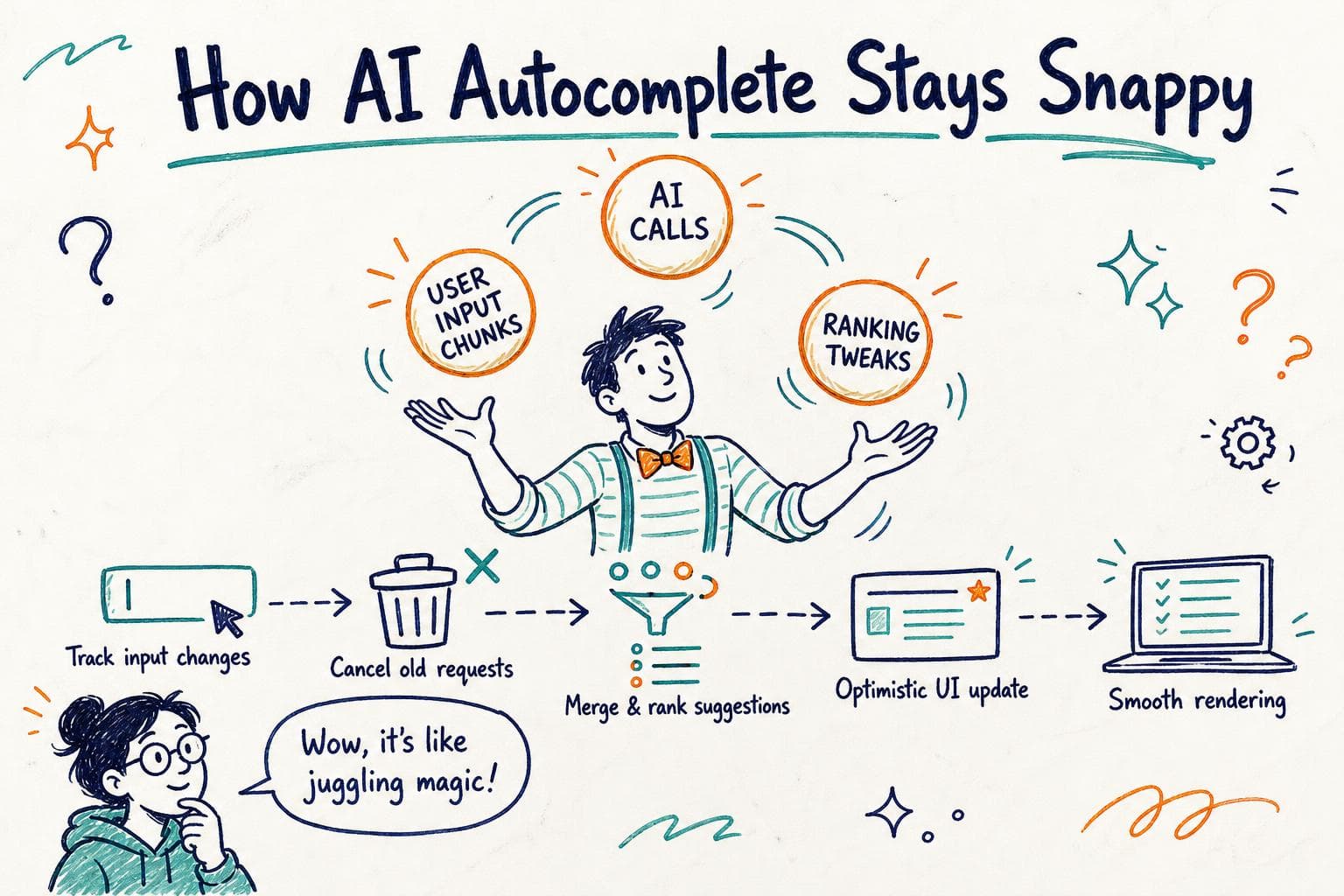
You know that moment when you’re typing into a search box or code editor, and the AI-powered autocomplete kicks in with suggestions that seem to magically understand exactly what you want next? But sometimes, it feels like the suggestions lag behind, or worse, flicker away just as you’re about to pick one. Maybe you’ve even typed a bit more, but the dropdown still shows results from your earlier input.
Getting AI autocomplete UIs to feel smooth and intuitive isn’t just about having a great model. Under the hood, there’s a delicate dance going on: tracking your input context, ranking suggestions freshly each keystroke, juggling network latency, and updating the UI state without blocking your typing.
I recently dug into the guts of one such system and want to share what I learned about how these interfaces handle context and suggestion ranking to stay responsive and relevant.
The Challenge: Typing Fast vs AI Processing Latency
Autocomplete feels easy when suggestions pop up instantly with every keystroke. But AI models, especially ones running on a server or heavy local models, come with inherent latency , sometimes 100ms to 300ms or more.
Typing speed easily outpaces that. You might type several characters while the AI is still thinking. So how does the UI keep up without showing stale or jarring suggestions?
Spoiler: the interface needs to track context carefully, cancel or ignore outdated requests, and optimistically update the UI without blocking input.
Tracking Context Incrementally: What You’ve Typed So Far
At first glance, you might think the autocomplete just sends the whole input string to the AI each time and shows the results. But that’s inefficient and clunky.
Instead, good implementations track the incremental changes:
- What was the last query sent to the AI?
- What new characters did the user type or delete?
- Is the current input a simple extension or a rewrite?
This lets the frontend decide if it can reuse cached suggestions or if it needs fresh AI results.
For example, if you typed "rea" and got suggestions, then quickly added "ct", the UI can recognize that "react" extends the previous context and update the suggestions accordingly, possibly even triggering a new AI call.
Suggestion Ranking: Not Just AI Scores
The AI model returns a list of suggestions, often with confidence scores or probabilities. But the UI rarely blindly trusts them.
Why? Because your interface needs to balance relevance, diversity, and user interaction patterns.
Here’s what usually happens:
-
Re-ranking client-side: The frontend applies heuristics like promoting suggestions you’ve recently accepted, demoting those you rejected, or favoring shorter completions when you’re typing quickly.
-
Filtering: Some suggestions might be blocked if they contain disallowed content or don’t match simple syntax rules.
-
Merging: In some apps, suggestions come from multiple sources , AI, static snippets, history , and the UI merges and ranks them together.
This layered ranking keeps suggestions practical and personalized beyond raw AI output.
Handling AI Latency: Optimistic UI and Request Cancellation
One of the trickiest parts is dealing with AI call latency without freezing or flickering the UI.
Here’s the typical approach:
-
Debouncing: Don’t send a request on every keystroke immediately. Wait a short delay (e.g., 100ms) to batch rapid typing.
-
Cancellation tokens: When a new input arrives before the previous AI call completes, cancel or ignore the older request’s results.
-
Optimistic updates: Show the previous suggestions or a loading state instead of blanking the dropdown.
-
Progressive update: When the new AI response arrives, update the suggestions smoothly, preserving focus and selection.
This way, the UI avoids jarring flickers and keeps input fluid.
Updating the UI State Without Blocking You
You might wonder: does rendering new suggestions cause input lag? It can, especially if the suggestion list is large or uses complex components.
To keep the UI responsive, these systems:
-
Use lightweight rendering for suggestions, avoiding expensive layout or style recalculations.
-
Employ virtualization to render only visible suggestion rows.
-
Defer low-priority updates using techniques like
requestIdleCallbackor React’sstartTransitionto separate urgent input handling from rendering suggestions. -
Batch state updates efficiently to avoid multiple re-renders per keystroke.
This careful orchestration keeps your typing buttery smooth, even as the AI crunches data in the background.
Real-World Example: Autocomplete in a Code Editor
Imagine a code editor with AI autocomplete for JavaScript. You’ve typed conso, and the AI suggests console.log. You start typing console. and expect the suggestions to update immediately.
Under the hood:
-
The frontend tracks the current token
console.and notes the previous request was forconso. -
It cancels the previous AI call if still pending.
-
It sends a new request with the updated context.
-
Meanwhile, it keeps showing the previous suggestions or a spinner.
-
When the new AI response arrives, it merges those suggestions with cached snippets (like
console.error) and ranks them. -
It updates the dropdown smoothly without stealing focus or interrupting your typing.
If the AI model takes longer, the UI might show partial suggestions or fallback completions, ensuring you never stare at a blank box.
When Things Go Wrong: Flicker, Stale Suggestions, or Input Jank
If you see flickering suggestions or outdated completions, it often means the UI isn’t properly canceling outdated requests or is re-rendering the entire suggestion list too aggressively.
Sometimes, latency spikes cause the UI to replace suggestions with empty states temporarily, confusing users.
Debugging these issues involves:
-
Inspecting network requests to ensure stale calls are canceled or ignored.
-
Profiling rendering to find expensive re-renders.
-
Adding logging to track input changes and suggestion updates.
Optimizing these areas makes autocomplete feel reliable and smooth.
AI autocomplete UIs are more than just flashy UX; they’re a careful balance of managing user input context, ranking suggestions with layered logic, handling AI latency gracefully, and updating the interface in a way that never gets in your way.
Next time your favorite autocomplete just gets what you’re typing without a hitch, you’ll know a bit about the engineering behind the curtain.